Input field with yellow border
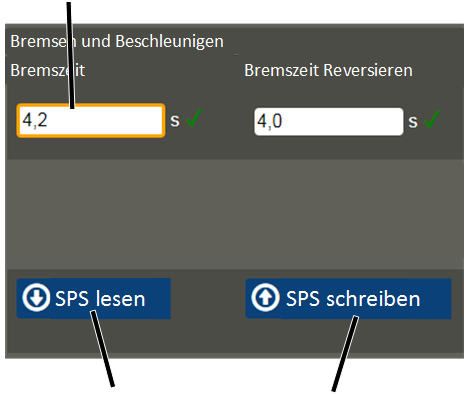
"Read PLC" button
"Write PLC" button
After one or several values have been entered or selected within a window, the values must be transmitted to ABUControl.
Every time a window is opened, the currently set values are read from ABUControl and displayed. If values are input or selected but not saved, the next time the window is opened the original values that are still saved in ABUControl are displayed again.
After new values are input or selected:
|
Input field with yellow border |
|
|
| |
|
"Read PLC" button |
"Write PLC" button |
● If the value was changed, a yellow border appears around the input field or the selection field.
Changing additional values:
 Press the TAB button to jump to
the next input field or selection field.
Press the TAB button to jump to
the next input field or selection field.
There you can change additional values as described previously.
● The new values are not yet saved.
Saving values individually or all together:
Press the ENTER button.
or
Click on the "Write PLC" button.
● The message "Processing..." appears.
● A green tick appears in the centre of the screen.
● The new values are saved in ABUControl.
In some windows, several "Read PLC" and "Write PLC" buttons are available. The buttons are then applicable for the area that is summarised by colour (through different levels of grey).
If the values are not to be saved:
Click on the "Read PLC"
button.
● The original values that are still saved in ABUControl are displayed again.
If one or more values are invalid when saving:
● If the new value lies outside the permitted value range, a red cross appears next to the input field. The input field background also becomes red.
● An error message is displayed.
What the error message looks like depends on the browser used.
● So long as only one value is invalid when saving, none of the values on the current page are saved.
A red cross appears in the centre of the screen:
● An error occurred when saving the values.
Reload the current page.
Enter the desired values
again.
Click on the "Write PLC"
button.
If the problem persists,
re-establish the connection of KranOS and PLC. See Connection between KranOS and
PLC.