Disassemble the faulty gear
limit switch.
Disassemble the faulty gear
limit switch.The absolute rotary encoder is mounted on the gear limit switch and determines the exact position of the cable drum, and then reports this to the PLC.
For this work step, access from a laptop or tablet computer to KranOS is necessary. The user "Abnahme" (commissioning) (user level ‚[2]) or "Service" (user level [1]) must be logged in.
After replacing the entire unit, the new absolute rotary encoder must be automatically or manually addressed and referenced.
The ABUS gear limit switch "GGS" with absolute rotary encoder "AWG" is fully compatible with the "GPK" hoist limit switches with "Kübler" absolute rotary encoders. If necessary, a "GPK" hoist limit switch can however be installed with a "Kübler" absolute rotary encoder.
Disassemble the faulty gear
limit switch.
Install new gear limit switch.
See product manual "ABUS gear limit switch with absolute rotary encoder", section "Installing and connecting gear limit switch“.
Reset switching points for the
bottom hoist limiter, the top hoist limiter and the backup limiter.
See Setting switching points for backup limiter and top hoist limiter.
See Setting switching point for the bottom hoist limiter.
The absolute rotary encoder has to be referenced after it is replaced. This referencing is not part of setting the switching points for the gear limit switch, nor is it part of calibrating the load measuring system, but is instead important for internal calculations (e.g. sway control and discard prognosis). If the absolute rotary encoder is not correctly referenced, malfunctions of the sway control or incorrect calculations in the discard prognosis could occur.
The three switching points of the gear limit switch should already be correctly set before the absolute rotary encoder is referenced.
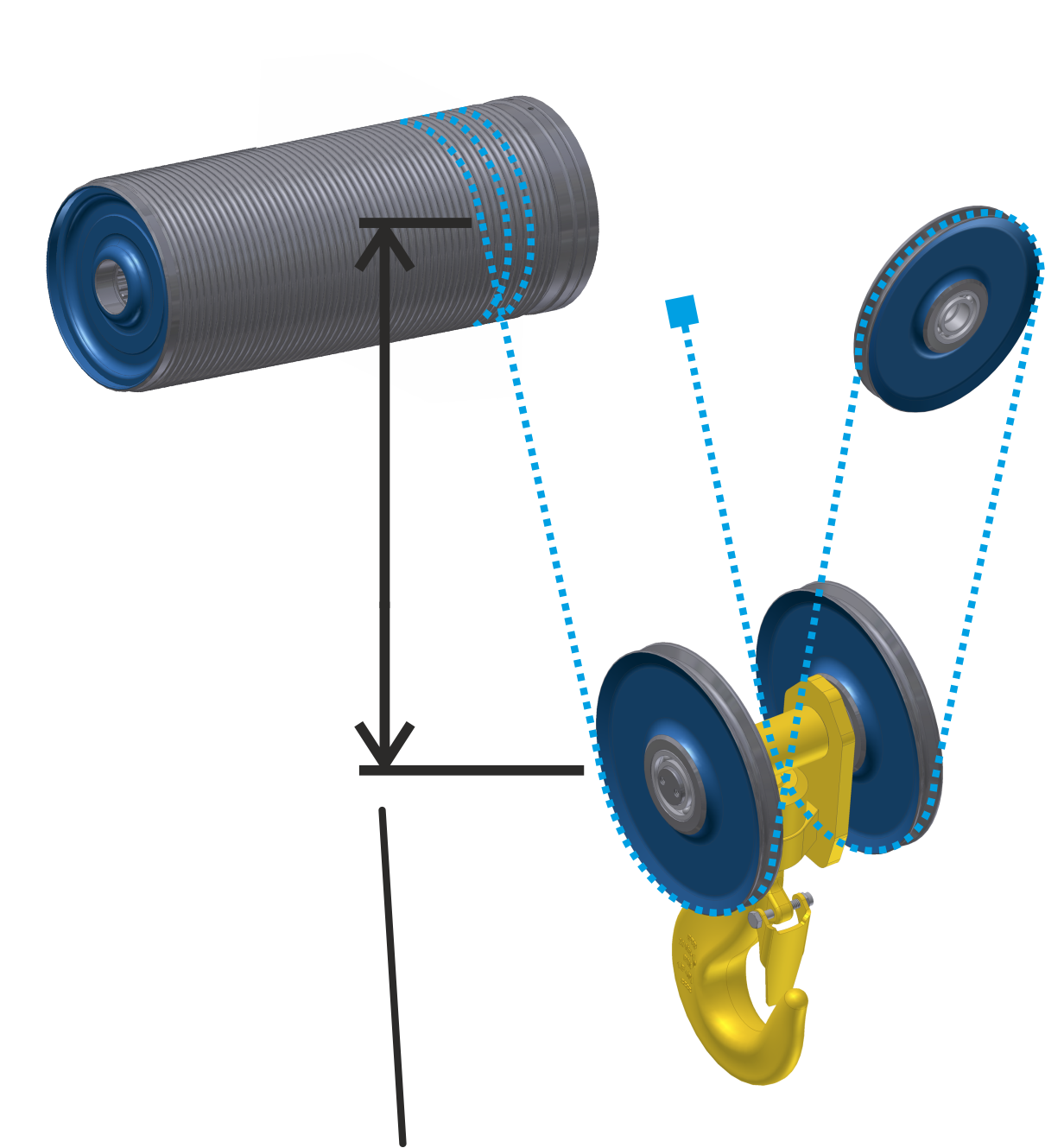
Measuring reference position:
|
| |
|
Reference position |
|
Move the load hook to a hook
position in which the reference position can be easily measured (e.g. about
1.5 m under the highest hook position).
Measure the vertical distance
from the centre of the cable drum to the centre of the deflection roller of the
bottom block.
Setting the reference point:
|
Overview: Navigation in KranOS |
|
User "Service" or "Abnahme" (commissioning) à "Hoist" à "Absolute rotary encoder" |
Log in to KranOS with user
"Service" (user level [1]) or "Abnahme" (commissioning) (user level [2]). See
Connecting laptop or
tablet computer with ABUControl.
Select the desired hoist (e.g.
Hoist 1) in the main menu.
● The window for the requested hoist appears.
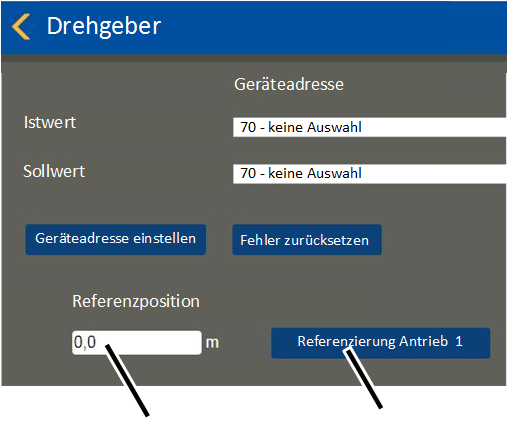
Click on the "Absolute rotary
encoder" menu item in the "Settings" menu (three horizontal bars).
|
|
|
|
| |
|
"Reference position" input field |
"Drive 1 referencing" button |
● The "Absolute rotary encoder" window appears.
● Enter the value you measured in the "Reference position" input field.
Click on the button for the
desired drive (e.g. "Drive 1 referencing").
|
| |
|
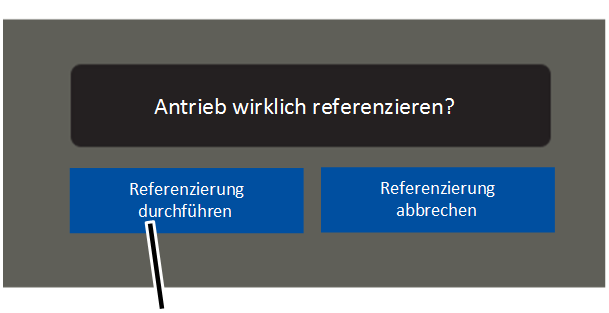
"Perform referencing" button |
|
● A confirmation prompt appears.
Click on the "Perform
referencing" button.
● Save the input value.