Log in to KranOS with user
"Service" (user level [1]) or "Abnahme" (commissioning) (user level [2]). See
Connecting laptop or
tablet computer with ABUControl.
Log in to KranOS with user
"Service" (user level [1]) or "Abnahme" (commissioning) (user level [2]). See
Connecting laptop or
tablet computer with ABUControl.It can be helpful to display the log file for analysing faults or in conversation with ABUS Service.
For this work step, access from a laptop or tablet computer to KranOS is necessary. The user "Abnahme" (commissioning) (user level ‚[2]) or "Service" (user level [1]) must be logged in.
|
Overview: Navigation in KranOS |
|
User "Service" or "Abnahme" (commissioning) à "PLC diagnosis" |
Log in to KranOS with user
"Service" (user level [1]) or "Abnahme" (commissioning) (user level [2]). See
Connecting laptop or
tablet computer with ABUControl.
In the start window: Click on
the "PLC diagnosis" menu item in the "Settings" menu (three horizontal
bars).
● The "PLC diagnosis" window appears.
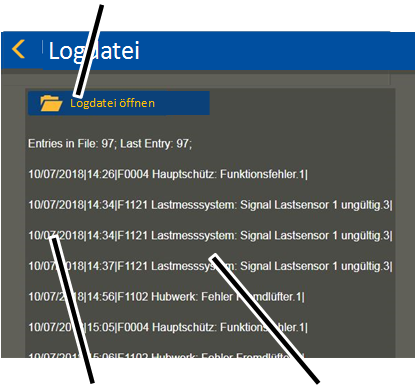
Click on the "Open log file"
button.
Read the last entries:
|
"Open log file" button |
|
|
| |
|
Date and time |
Message |
The last 15 messages of the log
file are displayed.
● Every message is displayed in its own line.
● The messages and fault codes are saved in the log file with the date and time.
For further details on fault codes, messages, confirming and designating messages, see Eliminating errors on the crane with ABUControl.
Viewing the entire log file:
|
|
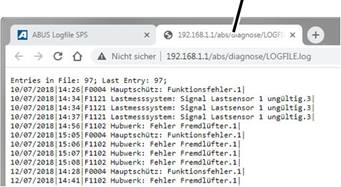
New tab |
|
| |
|
|
|
Click on the "Open log file"
button.
● A new tab opens in the browser and the entire log file is displayed.
The log file is comprised of a maximum of 500 entries. If the maximum number of 500 entries is reached, the oldest entries at the beginning of the log file are overwritten. This means that the entries at the beginning of the log file could be more recent than those at the end of the log file.