Log in as user "Abnahme"
(commissioning) (user level [2]) in KranOS. See Connecting laptop or
tablet computer with ABUControl.
Log in as user "Abnahme"
(commissioning) (user level [2]) in KranOS. See Connecting laptop or
tablet computer with ABUControl.In some circumstances it may be necessary to switch the travel direction of the crane or trolley. This can be required, for example, if the crane was installed differently than was specified in the planning documents.
All specification related to travel directions are thereby switched. This applies, for example, to the buttons on the transmitter of the radio remote control, all displays in KranOS, the evaluated motion restrictors as well as cross-type limit switches and distance sensors, all error messages related to travel directions, etc.
For this work step, access from a laptop or tablet computer to KranOS is necessary. The user "Abnahme" (commissioning) (user level ‚[2]) must be logged in.
|
Overview: Navigation in KranOS |
|
User "Abnahme" (commissioning) à "Movement profile" From program version 2.3.0.1 |
Log in as user "Abnahme"
(commissioning) (user level [2]) in KranOS. See Connecting laptop or
tablet computer with ABUControl.
In the start window: Click on
the "Movement profile" menu item in the "Settings" menu (three horizontal
bars).
|
| |
|
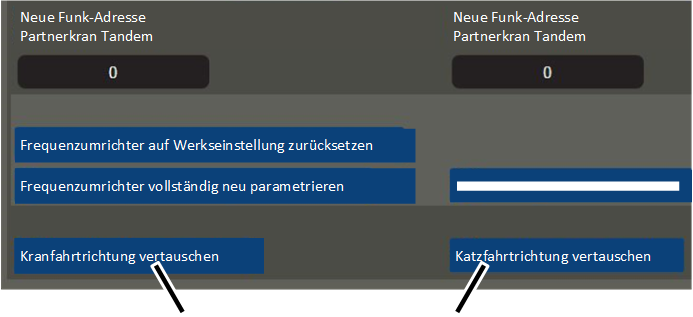
"Switch crane travel direction" button |
"Switch trolley travel direction" button |
● The "Movement profile" window appears.
Click the button "Switch crane
travel direction" or "Switch trolley travel direction".
● The button's background lights up red.
● All specifications related to travel directions for crane travel or trolley travel are switched.
● The switch of the travel direction is sustained and also remains saved if the crane is switched off and then back on again.