Log in to KranOS with user
"Service" (user level [1]). See Connecting laptop or
tablet computer with ABUControl.
Log in to KranOS with user
"Service" (user level [1]). See Connecting laptop or
tablet computer with ABUControl.The movement profiles of all three crane axes (crane travel profile, trolley travel profile, hoist profile) can be adjusted to individual usage in the acceleration and braking behaviour.
For this work step, access from a laptop or tablet computer to KranOS is necessary. The user "Service" (user level [1]) must be logged in.
|
Overview: Navigation in KranOS |
|
User "Service" à "Movement profile parameter" |
|
Note: The "Movement profile parameter" window is the only window in KranOS that can be opened by the "Service" user but not by the "Abnahme" (commissioning) user. For all other windows that can be opened by the "Service" user, they can also be opened by the "Abnahme" (commissioning) user, since the "Abnahme" (commissioning) user generally has higher-level authorisations than the "Service" user. The parameters in the "Movement profile parameter" window are however only summarised here for the "Service" user. The parameters can be set by the "Abnahme" (commissioning) user in addition to many other parameters in the windows "Crane travel profile parameter" (or "Trolley travel profile parameter" or "Hoist profile parameter"). |
Log in to KranOS with user
"Service" (user level [1]). See Connecting laptop or
tablet computer with ABUControl.
In the start window: Click on
the "Movement profile parameter" menu item in the "Settings" menu (three
horizontal bars).
|
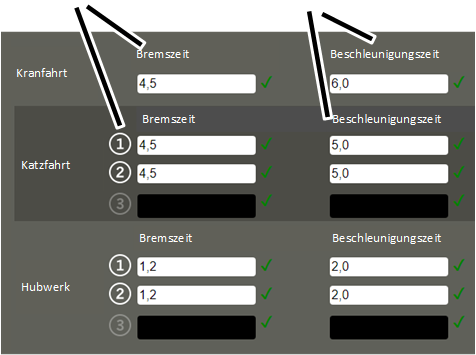
Braking time |
Acceleration time |
|
| |
● The "Movement profile parameter" window appears.
● The current settings are displayed.
Set the desired values:
|
|
Danger due to too short braking time and acceleration time If the braking time or acceleration time is set too short, excessive load can be placed on the statics of the supporting structure (e.g. of the building) and damage it. Before changing the parameter, contact ABUS Service. |
|
|
Danger due to too long braking time If the braking time is too long, the crane (the trolley) could possibly not come to a stop in time to avoid colliding with other cranes (trolleys). After changing the parameter, test the braking time. |
─ "Braking time": Time in which the drive brakes from the travel speed.
The entered time always refers to the complete braking from the maximum travel speed according to the type plate until a standstill is reached.
─ "Acceleration time": Time in which the drive accelerates to the travel speed.
The entered time always refers to the complete acceleration from a standstill until the maximum travel speed according to the type plate is reached.
With this value, the drive accelerates from a standstill when the key is pressed in the first level, or if the key is pressed and held in the second level.
Click on the "Write PLC"
button.