Only with restart function of the crane
The function "Restart crane" is used to restart the crane by electrically disconnecting the supply voltage.
For this work step, access from a laptop or tablet computer to KranOS is necessary. The user "Abnahme" (commissioning) (user level [2]) or "Service" (user level [1]) must be logged in.
Opening the PLC diagnosis page
|
Overview: Navigation in KranOS |
|
User "Service" or "Abnahme" (commissioning) à "PLC diagnosis" From program version 2.3.0.1 |
 Log in to KranOS with user
"Service" (user level ‚[1]) or "Abnahme" (commissioning) (user level [2]). See
Connecting laptop or
tablet computer with ABUControl.
Log in to KranOS with user
"Service" (user level ‚[1]) or "Abnahme" (commissioning) (user level [2]). See
Connecting laptop or
tablet computer with ABUControl.
In the start window: Click on
the "PLC diagnosis" menu item in the "Settings" menu (three horizontal
bars).
Restarting crane
|
|
|
|
| |
|
"Restart crane" button |
|
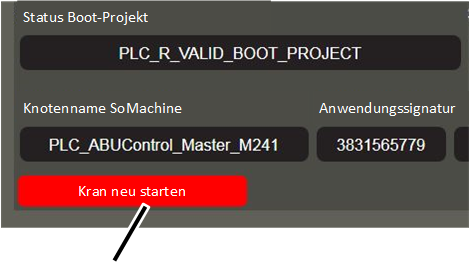
● The "PLC diagnosis" window appears.
Click the "Restart crane"
button.
● The operating voltage is briefly interrupted and then switched on again.
● The crane control is restarted.