Log in to KranOS with user
"Service" (user level [1]) or "Abnahme" (commissioning) (user level [2]). See
Connecting laptop or
tablet computer with ABUControl.
Log in to KranOS with user
"Service" (user level [1]) or "Abnahme" (commissioning) (user level [2]). See
Connecting laptop or
tablet computer with ABUControl.When starting the crane, the parameters of the frequency converter are read out and compared with the specified configuration of the PLC. If the parameters do not match, the parameters are automatically transferred again to the respective frequency converter.
The parameters can also be manually transferred again.
For this work step, access from a laptop or tablet computer to KranOS is necessary. The user "Abnahme" (commissioning) (user level ‚[2]) or "Service" (user level [1]) must be logged in.
|
Overview: Navigation in KranOS |
|
User "Service" or "Abnahme" (commissioning) à "Movement profile" |
Log in to KranOS with user
"Service" (user level [1]) or "Abnahme" (commissioning) (user level [2]). See
Connecting laptop or
tablet computer with ABUControl.
In the start window: Click on
the "Movement profile" menu item in the "Settings" menu (three horizontal
bars).
|
| |
|
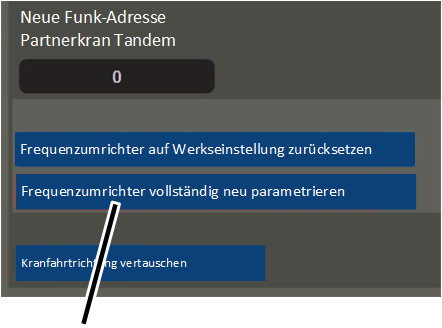
"Completely reparametrize the frequency converter" button |
|
● The "Movement profile" window appears.
● The button "Completely reparametrize the frequency converter" shows the status of the parametrization:
─ Green background (default): The frequency converterhas already been parametrized by the PLC.
─ Blue background: The frequency converter will be reprogrammed at the next switching on of the PLC.
Click the button "Completely
reparametrize the frequency converter".
● The button's background turns blue.
Switch off the crane at the
circuit isolator or mains switch.
Wait 60 seconds.
Switch the crane on again.
● ABUControl will restart.
● The frequency converter will additionally be parametrized during the restart.