Log in as user "Abnahme"
(commissioning) (user level [2]) in KranOS. See Connecting laptop or
tablet computer with ABUControl.
Log in as user "Abnahme"
(commissioning) (user level [2]) in KranOS. See Connecting laptop or
tablet computer with ABUControl.The length of the lifting tackle must be correctly set so that the sway control functions correctly.
Both the switching on and off as well as the sway control setting can be quickly and conveniently carried out via the ABURemote transmitter. See “ABURemote” product manual.
Alternatively, the sway control can also be switched on and off and set in KranOS. If the sway control is switched on in KranOS, it must be switched off there as well. The setting in KranOS is independent of the ABURemote transmitter and is not displayed there.
For this work step, access from a laptop or tablet computer to KranOS is necessary. The user "Abnahme" (commissioning) (user level ‚[2]) must be logged in.
|
Overview: Navigation in KranOS |
|
User "Abnahme" (commissioning) à "Hoist" à "Hoist profile parameter" à "Sway control parameter" |
Log in as user "Abnahme"
(commissioning) (user level [2]) in KranOS. See Connecting laptop or
tablet computer with ABUControl.
Select the desired hoist (e.g.
Hoist 1) in the main menu.
● The window for the requested hoist appears.
Click on the "Hoist profile
parameter" menu item in the "Settings" menu (three horizontal bars).
● The "Hoist profile parameter" window appears.
Click on the "Sway control
parameter" menu item in the "Settings" menu (three horizontal bars).
|
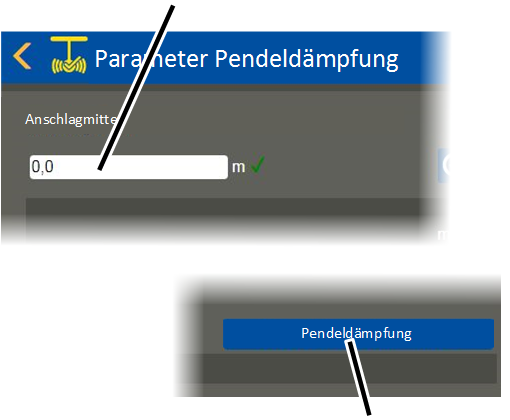
"Lifting tackle" input field |
|
|
| |
|
|
"Sway control" button |
● The "Sway control parameter" window appears.
Input the length of the lifting tackle:
Enter the distance between the
load hook and the centre of gravity in the "Lifting tackle" input field. This
factors in the length of the lifting tackle.
See also the ABURemote product manual.
Click on the "Write PLC"
button.
Switch sway control on:
Click on the "Sway control"
button.
● The button's background turns green.
● The sway control is now activated.
Switch sway control off:
Click on the "Sway control"
button.
● The button's background is no longer green.
● The sway control is now deactivated.